commander 现已有中文版本文档,可直接参考
介绍
Commander是tj大神开发的一款针对NodeJS的完整命令行解决方案。
广泛用于前端脚手架的开发,例如大名鼎鼎的Vue-CLI等,目前(2021-06-29)最新版本为8.x, 本文使用的版本即为8.x
安装
# use NPM
npm install commander
# use Yarn
yarn add commander
# use pnpm
pnpm install commander
使用
以vue create命令为例
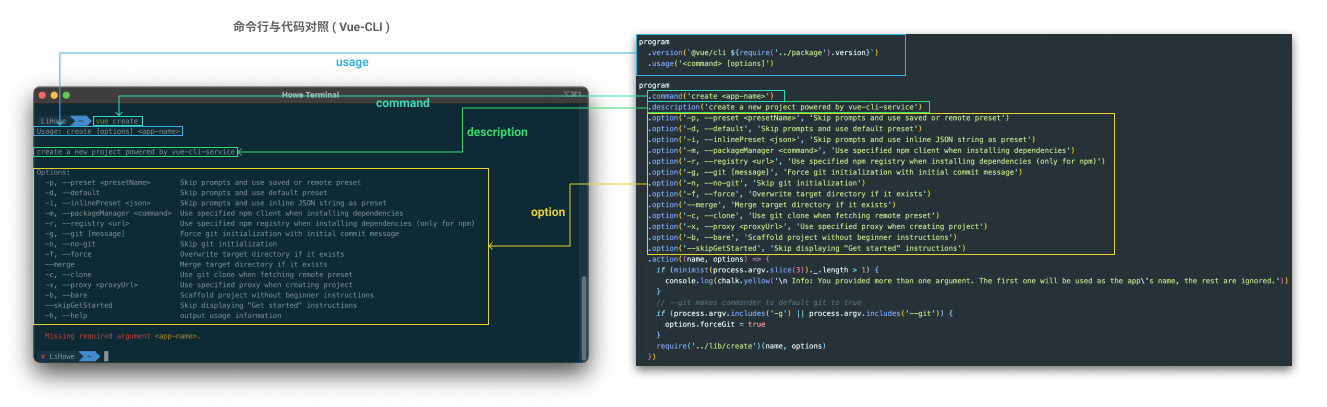
获取Commander实例
- 在JavaScript中使用
// 在JavaScript中使用
const { program } = require('commander')- 在TypeScript中使用
# 安装对应type声明文件
npm i @types/commander -D
# 或者
yarn add @types/commander -D
// 在TypeScript中使用, commander有对应type声明文件
import { program } from 'commander'命令(Command)
你可以使用.command(命令定义, 命令描述)或者.addCommand()来为program添加指定命令.
其中命令定义可以使用以下形式
program.command('command')program.command('command <argument>')program.command('command [argument]')program.command('command <argument1> [argument2]')
例如:
标准使用
const { program } = require('commander')

program
    .command('create')
    .description('命令描述')
    .action(() => {
        console.log('执行 create')
    })

program
    .command('hidden-create', { hidden: true })
    .description('不会显示在帮助信息中')
    .action(() => {
        console.log('执行 hidden create')
    })

program
    .command('hidden-default', { hidden: true, isDefault: true })
    .description('不会显示在帮助信息中, 且默认执行这个命令')
    .option('-p --port <port>', '端口', 80)
    .action(async (option) => {
        console.log('执行 hidden default, port is', option.port)
        await new Promise(resolve => {
            console.log('正在执行 hidden default...')
            setTimeout(() => {
                resolve(true)
            }, 3000)
        })
        console.log('执行 hidden default 完毕')
    })

// 同步用parse(), 异步用这个
// 默认参数为process.argv
program.parseAsync()

// $ node ./bin/command/basic.js create
// -> 执行 create

// $ node ./bin/command/basic.js
// -> 执行 hidden default, port is 80
// -> 正在执行 hidden default...
// -> 执行 hidden default 完毕
嵌套命令
const { program } = require('commander')
const drink = program.command('drink')

drink
	.command('coffee')
	.action(() => {
		console.log('喝咖啡☕️')
	})

drink
	.command('tea')
	.action(() => {
		console.log('喝茶🍵')
	})
program.parse()

// $ node ./bin/demo.js drink tea
// 喝茶🍵使用addCommand()方法添加嵌套命令
function eat () {
	const eat = new commander.Command('eat')
	eat
		.command('bread')
		.action(() => {
			console.log('吃面包🍞')
		})

	eat
		.command('drumstick')
		.action(() => {
			console.log('吃鸡腿🍗')
		})
	return eat
}

program.addCommand(eat())
program.parse()

// $ node ./bin/demo.js eat bread
// 吃面包🍞
参数(Argument)
argument用来为命令程序添加可输入的必填/选填参数
大致有下面几种添加方式👇
必填参数
不可带默认值, 否则会抛出错误a default value for a required argument is never used: '参数名'
.argument(<必填参数>): 指定必填参数.argument(<必填参数>, 参数描述): 指定必填参数并携带描述信息.argument(<必填参数>, 参数描述, 参数处理方法): 可以指定处理方法来处理参数
可选参数
.argument([可选参数]): 指定可选参数.argument([可选参数], 参数描述): 指定可选参数并携带描述信息.argument([可选参数], 参数描述, 默认值): 指定可选参数,描述信息以及默认值.argument([可选参数], 参数描述, 参数处理方法, 默认值): 可以指定处理方法来处理参数
可变数量参数
.argument(<args...>, 参数描述): 指定可变数量必填参数.argument([args...], 参数描述, 默认值): 指定可变数量可选参数.argument([args...], 参数描述, 参数处理方法, 默认值): 指定可变数量可选参数
单次定义多参数
.arguments(<必填参数1> <必填参数2> [可选参数]): 指定多参数, 但不能添加描述
额外配置
可以使用.addArgument(Argument)这种不常用的方法来获得额外配置
例 - 标准写法
const { program } = require('commander')
program
    .command('test <name> [age]')
    .action((name, age) => {
        console.log('名字是:', name)
        console.log('年龄是:', age)
    })
program.parse()
// $ node ./bin/command-arguments.js test lihowe
// 名字是: lihowe
// 年龄是: undefined

// $ node ./bin/command-arguments.js test lihowe 18
// 名字是: lihowe
// 年龄是: 18
例 - 混用
const { program } = require('commander')
program
    .command('test [age]')
    .argument('<name>', '名字')
    .action((name, age) => {
        console.log('名字是:', name)
        console.log('年龄是:', age)
    })
program.parse()
// $ node ./bin/command-arguments.js test lihowe 18
// 名字是: lihowe
// 年龄是: 18
例 - 全部使用argument定义command参数
const { program } = require('commander')
program
    .command('test')
    .argument('<name>', '名字')
    .argument('[age]', '年龄', '18')
    .action((name, age) => {
        console.log('名字是:', name)
        console.log('年龄是:', age)
    })
program.parse()
// $ node ./bin/command-arguments.js test lihowe
// 名字是: lihowe
// 年龄是: 18

// $ node ./bin/command-arguments.js test lihowe 1
// 名字是: lihowe
// 年龄是: 1
例 - 使用arguments一次定义多个参数
const { program } = require('commander')
program
    .command('test')
    .arguments('<name> [age]')
    .action((name, age) => {
        console.log('名字是:', name)
        console.log('年龄是:', age)
    })
program.parse()
// $ node ./bin/command-arguments.js test lihowe 18
// 名字是: lihowe
// 年龄是: 18
例 - 使用...来接收可变数量参数
const { program } = require('commander')
program
    .command('test')
    .argument('<args...>')
    .action((args) => {
        console.log('多参数,分别是:', )
        args.forEach(arg => {
            console.log(arg)
        })
    })
program.parse()
// $ node ./bin/command-arguments.js test arg1 arg2 li howe lihowe
// 多参数,分别是:
// arg1
// arg2
// li
// howe
// lihowe
例 - 添加参数处理方法来处理单参数
const { program } = require('commander')
program
    .command('test')
    .argument('[arg]', '单参数', (value) => {
        console.log('处理器接收值为:', value)
        console.log('处理器返回值为:', value + 'suffix')
        return value + 'suffix'
    },'default value')
    .action((arg) => {
        console.log('action接收值为:', arg)
    })
program.parse()
// $ node ./bin/command-arguments.js test a
// 处理器接收值为: a
// 处理器返回值为: asuffix
// action接收值为: asuffix
例 - 添加参数处理方法来处理多参数
const { program } = require('commander')
const args = []
program
    .command('test8')
    .argument('[args...]', '多参数', (value) => {
        console.log('处理器接收值为:', value)
        args.push(value)
        return args
    },['arg1', 'arg2'])
    .action((args) => {
        console.log('多参数,分别是:')
        args.forEach(item => {
            console.log(item)
        })
    })

program.parse()
例 - 使用addArgument添加参数
const { program, Argument } = require('commander')
program
    .command('test')
    .addArgument(new Argument('<name>', '名字').choices(['li', 'howe', 'lihowe'])) // 用于限制名字输入, 名字的值必须在['li', 'howe', 'lihowe']中
    .addArgument(new Argument('[age]', '年龄').default(18, '默认值描述: 年年18岁'))
    .action((name, age) => {
        console.log('名字是:', name)
        console.log('年龄是:', age)
    })

// $ node ./bin/command-arguments.js test lih
// error: command-argument value 'lih' is invalid for argument 'name'. Allowed choices are li, howe, lihowe.

// node ./bin/command-arguments.js test li
// 名字是: li
// 年龄是: 18

// node ./bin/command-arguments.js test li 1
// 名字是: li
// 年龄是: 1
操作(Action)
action用来设置命令接收到一系列参数后的具体操作.action()方法参数数量为该命令的argument数量 + 2(options, command)
const { program } = require('commander')

program
  .command('demo') // 如果不定义command, 则 command.name 为文件名
  .argument('<name>')
  .argument('[age]')
  .option('-t, --title <title>', 'title to use before name')
  .option('-d, --debug', 'display some debugging') // 因为不接收输入, 所以类型为boolean
  .action((name, age, options, command) => {
    if (options.debug) {
      console.error('Called %s with options %o', command.name(), options);
    }
    const title = options.title ? `${options.title} ` : '';
    console.log(`Thank-you ${title}${name} ${age}`);
  })

program.parse()
// $ node ./bin/command-action.js demo lihowe -t giao 18 -d
// Called demo with options { title: 'giao', debug: true }
// Thank-you giao lihowe 18
选项(Option)
option选项是指命令行中常见的如-v, --save, -D等参数, 这些选项参数通过.option()方法来定义, 定义的同时可以附加选项简介。
每个option可以定义一个短名称(如-v, -后面接一个字符)以及一个长名称(如--version, --后面接一个或多个单词, 多个单词推荐用-连接,如--save-dev, 取值的时候字段名会转换为驼峰的形式(saveDev)), 如果定义了长名称, 则长名称将作为option的字段名, 否则使用短名称作为字段名
多个短选项在使用过程中可以合并进行简写, 最后一个选项可以附加参数(argument), 如-a -b -p 80可以写成-ab -p80或者 -abp80
command实例默认定义有-h, --help选项, 用于显示默认生成的命令帮助(可以被覆盖掉)
基本用法
option的用法与argument及其相似
.option('-短名称, --长名称'): 短名称与长名称之间的分割符可以是逗号,空格或者|- `.option(‘-短名称, —长名称 <必填参数>’, 描述(可选), 参数默认值(可选))
- `.option(‘-短名称, —长名称 [可选参数]’, 描述(可选), 参数默认值(可选))
.option('-短名称, --长名称 <可变数量必填参数...>', '描述(可选)').option('-短名称, --长名称 [可变数量可选参数...]', '描述(可选)')- 可以使用
--来表明option的结尾,--后面的参数将会被忽略掉
例 - 基本使用
const { program } = require('commander')

program
    .option('-d --debug', '空格分隔')
    .option('-a, --all', '逗号分隔')
    .option('-t | --test', '|分隔')
    .option('-p <port>', '接收参数', 80) // 默认值 80
    .option('-B', '只有短名称')
    .option('--save', '只有长名称')
    .action((options) => {
        console.log(options)
    })

program.parse()

// 下面命令都是同样效果
// $ node ./bin/options.js -d -p 90
// $ node ./bin/options.js -dp 90
// $ node ./bin/options.js -dp90
// $ node ./bin/options.js -p90 -d
// $ node ./bin/options.js -p 90 -d
// $ node ./bin/options.js -p 90 -d -- -B --save
// -> { p: '90', debug: true }
例 - 可变参数
const { program } = require('commander')

program
    .option('-n --number [numbers...]', '可选可变数量参数', [100, 86])
    .option('-s <second...>', '必填可变数量参数')
    .action(option => {
        console.log(option)
    })

program.parse()

// $ node ./bin/option/variadic.js -n 1 2 3 -s 1 2 3
// -> { number: [ '1', '2', '3' ], s: [ '1', '2', '3' ] }

// $ node ./bin/option/variadic.js -n -s 1 2 3
// $ node ./bin/option/variadic.js -s 1 2 3
// -> { number: [ 100, 86 ], s: [ '1', '2', '3' ] }

// $ node ./bin/option/variadic.js -n
// -> { number: [ 100, 86 ] }.opts(): 获取command对象上的option定义
const { program } = require('commander')
const a = program
    .command('simple-option')
    .option('-d --debug', 'debug', true)

console.log(a.opts())
program.parse()--no-前缀: 定义默认值为true的长命令选项
const { program } = require('commander')
program
    .command('negative-option')
    .option('--no-debug', '表明默认debug为true')
    .action((options) => {
        console.log(options)
    })
program.parse()

// $ node ./bin/options.js negative-option
// -> { debug: true }

// $ node ./bin/options.js negative-option --no-debug
// -> { debug: false }
const { program } = require('commander')
program
.command('negative-option')
.option('--no-debug', '表明默认debug为true')
.option('-d --debug', '描述', false)
.action((options) => {
console.log(options)
})
program.parse()
// $ node ./bin/options.js negative-option
// -> { debug: false }
// $ node ./bin/options.js negative-option --debug
// $ node ./bin/options.js negative-option -d
// -> { debug: true }
// $ node ./bin/options.js negative-option --debug --no-debug
// -> { debug: false }
// $ node ./bin/options.js negative-option --no-debug --debug
// -> { debug: true }addOption(): 对option进行更多配置
const { program, Option } = require('commander')

program
    .addOption(new Option('-s --secret', 'hideHelp -- 不会在命令帮助信息的Options列表中显示').hideHelp())
    .addOption(new Option('-d --delay <delay>', '设置必填参数的默认值').default(60, '一分钟'))
    .addOption(new Option('-m --mode <mode>', '限制输入选项').choices(['normal', 'debug']))
    .action(option => {
        console.log(option)
    })

program.parse()

/*
$ node ./bin/option/advanced.js -h

Usage: advanced [options]

Options:
  -d --delay <delay>  设置必填参数的默认值 (default: 一分钟)
  -m --mode <mode>    限制输入选项 (choices: "normal", "debug")
  -h, --help          display help for command
*/

// $ node ./bin/option/advanced.js
// -> { delay: 60 }

// $ node ./bin/option/advanced.js -m n
// -> error: option '-m --mode <mode>' argument 'n' is invalid. Allowed choices are normal, debug.

// $ node ./bin/option/advanced.js -m normal
// -> { delay: 60, mode: 'normal' }处理option的接收值
与argument的处理函数一样, option定义的默认值不会调用处理函数
const { program } = require('commander')

program
    .option('-d --double <number>','超级加倍', (val) => {
        return parseInt(val, 10) * parseInt(val, 10)
    }, 10)
    .action(option => {
        console.log(option.double)
    })
program.parse()

// $ node ./bin/option/processer.js -d 4
// -> 16

// $ node ./bin/option/processer.js
// -> 10
版本(Version)
.version()用来设置命令当前版本, 默认选项标识为-V 和 --version
默认标识可以通过类似于option的语法进行覆盖, 可以参考下面例子
program
    .command('base-version')
    .version('0.0.1')

program
    .command('custom-version')
    .version('0.0.2', '-t --ver', '可以自定义版本选项')

program.parse()

// $ node ./bin/option/version.js base-version -V
// $ node ./bin/option/version.js base-version --version
// -> 0.0.1

// $ node ./bin/option/version.js custom-version -t
// $ node ./bin/option/version.js custom-version --ver
// -> 0.0.2
独立可执行(子)命令(Stand-alone)
当以.command(命令, 描述)方式设置命令的时候, Commander将会使用** 独立可执行文件(即 每个command都是一个单独的文件) **的形式来定义命令, 如
// main.js
const { Command } = require('commander')
const program = new Command()

program
    .version('0.0.1')
    .description('独立运行命令')
    .command('run', '执行命令')
    .command('test', '测试').alias('t')
    .command('install [name]', '安装').alias('i') // 为install起别名i
    .command('update', '更新', { executableFile: 'basic'}) // 自定义文件名称

program.parse()

// 👆上面定义的这些命令分别对应的命令文件为
// run -> main-run
// test -> main-test
// install -> main-install
// upate -> basic
生命周期钩子(Hook)
目前支持两个生命周期阶段
- preAction: 命令动作执行前,
.hook('preAction', handler) - postAction: 命令动作执行后,
.hook('afterAction', handler)
这两个生命周期钩子函数有两个默认参数thisCommand和actionCommand
thisCommand: 指顶级命令(最高层级命令)actionCommand: 指正在执行的命令, 当只有一个层级命令的时候thisCommand与actionCommand相同
const { program } = require('commander')

program
    .option('-p --port <port>')
    .hook('preAction', (thisCommand, actionCommand) => {
        console.log('pre action hook fn')
        console.log('this command name is:', thisCommand.name())
        console.log('action command name is:', actionCommand.name())
    })
    .hook('postAction', (thisCommand, actionCommand) => {
        console.log('after action hook fn')
    })
    .action(option => {
        console.log('option port is:', option.port)
    })
program
    .command('test')
    .action(() => {
        console.log('run test')
    })
program.parse()

// $ node bin/hook test
// -> pre action hook fn
// -> this command name is: hook
// -> action command name is: test
// -> run test
// -> after action hook fn

// $ node bin/hook -p 80
// -> pre action hook fn
// -> this command name is: hook
// -> action command name is: hook
// -> option port is: 80
// -> after action hook fn
自定义事件监听(On)
你可以通过监听command或者option事件来执行自定义操作
const { program } = require('commander')

// 监听指定command
program
    .on('command:test', () => {
        console.log('enter command listener')
    })
//  监听未定义command
program
    .on('command:*', function (operands) {
        console.log('enter command:* listener', operands)
    })

program
    .command('test')
    .option('-p <port>')
    // 监听选项p
    .on('option:p', opt => {
        console.log('enter option listener, option<p> is', opt)
    })
    .action(() => {
        console.log('enter action')
    })

program.parse()

// $ node ./bin/other/listener e a
// -> enter command:* listener [ 'e', 'a' ]

// $ node ./bin/other/listener.js test
// -> enter action
// -> enter command listener

// $ node ./bin/other/listener.js test -p 20
// -> enter option listener, option<p> is 20
// -> enter action
// -> enter command listener
帮助(Help)
默认Commander会根据用户定义的命令配置自动生成帮助信息
$ node bin/hook -h

Usage: hook [options] [command]

Options:
  -p --port <port>
  -h, --help        display help for command

Commands:
  test
如果不需要自动生成的帮助信息, 可以使用.helpOption(false)来关闭
.helpOption()方法也可以用来自定义全局的帮助选项
.helpOption('-e --custom', '描述:自定义帮助参数'): 这样全局的-h --help就被覆写为-e --custom了
帮助信息插槽
Commander预留了以下自定义帮助信息插槽
beforeAll: 在** 所有的 **命令帮助信息的最顶部显示, 相当于全局bannerbefore: 在当前命令帮助信息的最顶部显示after: 在当前命令帮助信息的最底部显示afterAll: 在** 所有的 **命令帮助信息的最底部显示, 相当于全局footer
例如:
命令的定义文件
const { program } = require('commander')

program
    .option('-p --port <port>')
    .action(option => {
        console.log('option port is:', option.port)
    })

program
    .command('test')
    .action(() => {
        console.log('run test')
    })

program
    .addHelpText('before', 'this is before help text')
    .addHelpText('beforeAll', 'this is beforeAll help text')
    .addHelpText('after', 'this is after help text')
    .addHelpText('afterAll', 'this is afterAll help text')

program.parse()
不同的信息位置插槽对应的显示效果如下
$ node bin/hook test -h

this is beforeAll help text
Usage: hook test [options]

Options:
  -h, --help  display help for command
this is afterAll help text

$ node bin/hook -h
this is beforeAll help text
this is before help text
Usage: hook [options] [command]

Options:
  -p --port <port>
  -h, --help        display help for command

Commands:
  test
this is after help text
this is afterAll help text也可以使用showHelpAfterError('帮助信息')来在程序出错之后显示对应提示
const { program } = require('commander')
program
    .command('test')
    .showHelpAfterError('(this is help information after error)')

program.parse()

// $ node bin/hook test -error
// -> error: unknown option '-error'
// -> (this is help information after error)
其他帮助配置
.name('命令名称'): 用来设置命令的名称.usage('命令用法说明'): 用来自定义命令的用法提示.help(): 显示帮助信息并退出程序, 可以传入{ error: true}来将帮助信息作为stderr输出.outputHelp(): 显示帮助信息不退出程序, 也可以传入{ error: true}来将帮助信息作为stderr输出.helpInformation(): 用来获取命令帮助信息字符串
 const { program } = require('commander')

 program
     .name('custom-name')
     .usage('[global options] command')
     .description('这是命令描述')
 	  .helpOption('-e --H', '描述: 覆写帮助选项为 -e --H')

 console.log(program.helpInformation())

 program.parse()

 // $ node bin/other -e
 // 会输出两遍帮助信息, 第一遍为console.log输出
 // -> Usage: custom-name [global options] command
 // -> 这是命令描述
 // -> Options:
 // ->  -e --H  描述: 覆写帮助选项为 -e --H
其他
.parse(arr?, opt?)
默认第一个参数为需要解析的字符串数组, 如果忽略则默认为process.argv
如果参数遵循的约定与 node 不同, 那么设置第二个参数的from属性并进行传递:
'node': 默认值,argv[0]是应用,argv[1]是要跑的脚本,后续为用户参数;'electron':argv[1]根据 electron 应用是否打包而变化;'user': 来自用户的所有参数。
program.parse(process.argv, { form: 'node' }).enablePositionalOptions()
默认commander的选项(option)在子命令(command)的前后均可以被识别, 如果需要设置程序选项只能出现在子命令之前,则需要调用该方法进行配置
该设置主要是针对于 子命令的选项与程序选项重名 的场景
const { program } = require('commander')

program
  .option('-p --port <port>')
  .action(opt => {
  	console.log('program port is', opt.port)
  })

program
  .command('run')
  .option('-p --port <port>')
  .action(opt => {
  	console.log('run port is', opt.port)
  })

// 不启用enablePositionalOptions的时候 run -p 选项是无法进行赋值的
// program.enablePositionalOptions()

program.parse()

// $ node ./bin/option/positional run -p 30
// # 启用前
// -> run port is undefined
// # 启用后
// -> run port is 30
.passThroughOptions()
用于限定option位置, 配置该属性后option只能先于argument进行声明, option后面的参数全部会被解析为argument
const { program } = require('command')

program
  .argument('<utility>')
  .argument('[args...]')
  // .passThroughOptions()
  .option('-p --port <port>')
  .action((utility, args, options) => {
    console.log('utility is', utility)
    console.log('args is', args)
    console.log('options is', options)
  })

program.parse()

// 启用 .passThroughOptions()
// node ./bin/option/passThrough ut ar 12 32 -p 23
// utility is ut
// args is [ 'ar', '12', '32', '-p', '23' ]
// options is {}

// 未启用 .passThroughOptions()
// node ./bin/option/passThrough ut ar 12 32 -p 23
// utility is ut
// args is [ 'ar', '12', '32' ]
// options is { port: '23' }
.allowUnknownOption()
开启该配置则Commander会忽略无法识别的option(默认为报错)
const { program } = require('commander')

program
  .option('-p --port <port>')
  .action((options) => {
  console.log('options is', options)
	})
//   .allowUnknownOption()

program.parse()

// 未开启
// $ node ./bin/option/unknown -a
// error: unknown option '-a'

// 开启
// $ node ./bin/option/unknown -a
// options is {}
.allowExcessArguments(false)
默认Commander不会对过多的argument进行检查, 如果需要进行检查可开启该配置
当然, 如果你接受的参数是<args...> 或者 [args...]则该属性没什么影响
const { program } = require('commander')

program
  .argument('[location]', '地址', 'China')
  .argument('<name>')
  .action((location, name) => {
    console.log('location is', location)
    console.log('name is', name)
  })
	.allowExcessArguments(false)

program.parse()

// $ node ./bin/argument/excess hangzhou lihowe excess
// -> location is hangzhou
// -> name is lihowe

// $ node ./bin/argument/excess hangzhou lihowe excess
// -> error: too many arguments. Expected 2 arguments but got 3.
Demo
https://github.com/LiHowe/demo-commander